A symbolic algebra and graphing platform for the rest of us — visual exploration and intuitive interaction without writing code. Looks like math. Feels like math. No programming headaches.
Free LiveMath Viewer Mode · macOS · Windows · Linux Ubuntu · ChromeOS
Live
A steady-state machine — edit, animate, explore.
Visual
Notebooks that read like the math on your paper.
No code
Symbolic algebra without scripting headaches.
Cross-platform
One app. Mac, Windows, Linux, Chromebook, iPhone & iPad, Android phones & tablets — ARM64 and Intel64.
Not a black box
Show your work, animate the steps, change a value — watch everything react.
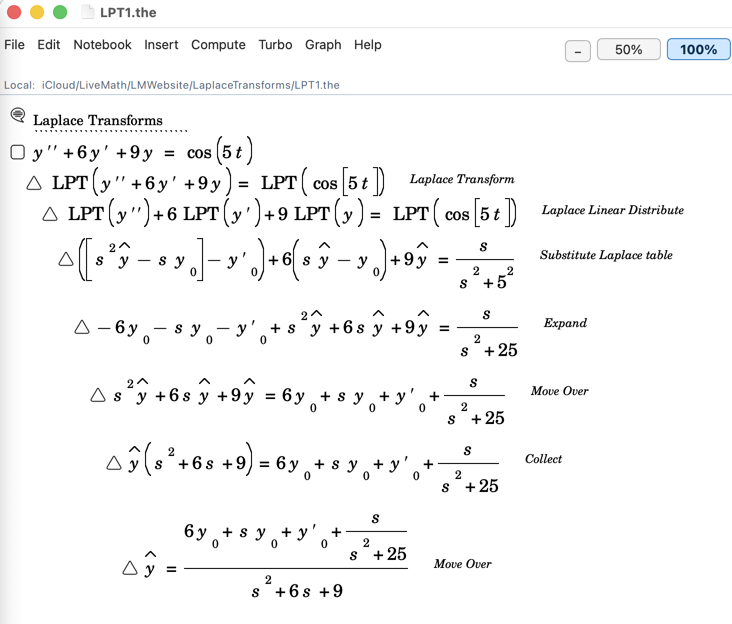
Unlike other math programs (or now chatbots) that just give you the output answer, LiveMath emulates how you do mathematics on paper. Present as few or as many intermediate steps as you wish, edit anything, and the whole notebook stays live. That’s the LIVE in LiveMath.
Tangle CubeImplicit Surfaces!2D Linear TransformationNew Sliders!3D Linear TransformationUse Sliders to Control AnimationsLaplace TransformManually work through the steps of LPT2D Flow PlotsDifferential Equations Grapher — Click to add initial conditionsElementary Row OperationsDrag and Drop Linear AlgebraDouble FoliumGraph Animations
2D Linear TransformationNew Sliders!3D Linear TransformationUse Sliders to Control AnimationsLaplace TransformManually work through the steps of LPT2D Flow PlotsDifferential Equations Grapher — Click to add initial conditionsElementary Row OperationsDrag and Drop Linear AlgebraDouble FoliumGraph AnimationsTangle CubeImplicit Surfaces!
Version 4.5 · August 2026
What’s New — LiveMath on every screen you own.
LiveMath 4.0 rebuilt the application on a modern cross-platform foundation. What 4.5 does with that foundation is the larger story: LiveMath now runs on every screen you own, reads for free, speaks fifteen languages, and is faster everywhere. The mathematical engine underneath is the same one you know — the same propositions, the same manipulations, the same notebook philosophy.
Platforms
Every Screen You Own
LiveMath 4.5 ships simultaneously on macOS, Windows, Linux, iPad and iPhone, Android and Chromebook. A notebook saved on any of them opens on all of them: the .the format is identical everywhere, and Cmd-versus-Ctrl conventions are mapped automatically.
Licensing
Free Viewer Mode
LiveMath is now free to download on every platform. An unlicensed copy reads any notebook — every plot draws, every animation runs — replacing the old time-limited trial. Send someone a notebook and they can read it faithfully with nothing to buy.
Accessibility
MathSpeak
New in 4.5: LiveMath reads mathematics aloud. It reads structure rather than symbols left to right, walks a whole notebook karaoke-style with each proposition highlighted, and uses your system’s own voices. It is also a proofreading tool — an expression that sounds wrong usually is wrong.
Mobile
Touch-First
On phones, tablets and small windows LiveMath runs a single-window shell with a docked vertical palette. Drag a selection to substitute, drag across the notebook to marquee-select, flick to pan or rotate a graph, pinch to zoom the plot window. Several gestures are better than the mouse versions they generalise.
Mobile
On-Screen Math Keyboard
On a keyboardless device LiveMath brings its own keyboard, tuned for mathematics — the characters, operators and navigation keys a notebook actually needs, without fighting the system keyboard’s auto-correct.
Differential Equations
Flow Plots
The new Flow primitive draws differential equations directly: vector fields, phase portraits, higher-order equations, acceleration fields, flows in three dimensions and in other coordinate systems. Click the graph to drop initial conditions.
Differential Equations
Laplace Transforms
Transform, manipulate, invert — and step through every stage of the work, with the derivation staying live on the page.
Graphing
Inequality Plots
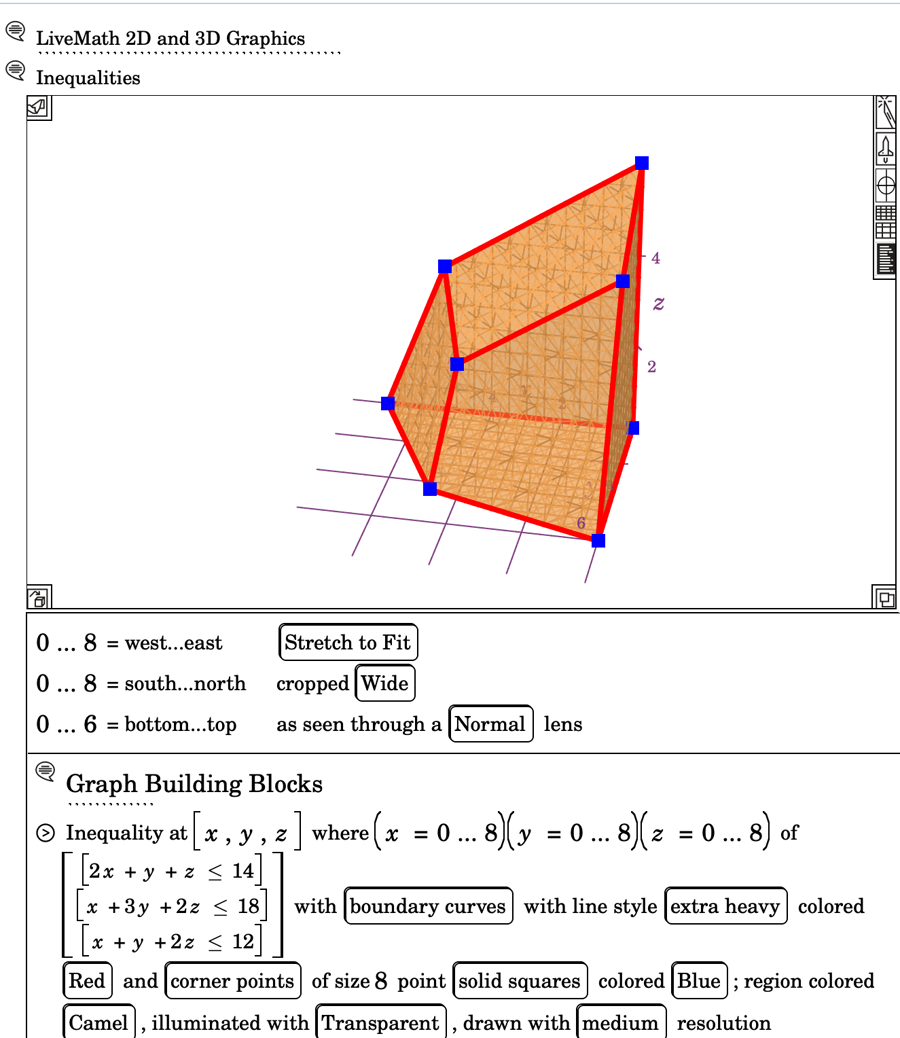
Graph 2D and 3D inequalities and systems of them, shade feasible sets in three dimensions, and solve linear-programming problems graphically with bounds you can edit.
3D Shapes
Shape Primitive
A Shape primitive with its own library — Platonic and Archimedean solids and more — rendered as real objects you can rotate, animate and dissect.
3D Graphing
Implicit Surfaces & Curves
Render quartics and other implicit surfaces straight from F(x,y,z) = 0 — no special syntax, just write the equation — plus implicit curves in 2D, algebraic space curves, and four-dimensional implicit surfaces.
Graphing
Click the Graph
AddPoints turns a plot into an input surface: click to add points, in two dimensions or with hit-testing in three. Dynamic colouring drives colour, light and line from the mathematics itself.
Calculus
Vector Calculus
Gradient, antigradient, divergence, curl and Laplacian as first-class notebook citizens, alongside integration by parts and substitution, limits via factoring and L’Hôpital’s rule, and piecewise integrands.
Linear Algebra
Matrix Decompositions
SVD and eigen factorisation, LUP and QR, pseudo-inverse, matrix exponentiation, row reduction, and conversion between systems of equations and matrix equations.
Tabular
Transforms & Fitting
Fourier and inverse Fourier transforms, fit on basis with goodness-of-fit, tabular function inverses, differential-equation integration, and CSV import and export.
Animation
Export as MP4 & SVG
Animate any graph and export it as an MP4 using your system’s own H.264 encoder, or as SVG. Sliders — themselves new in 4.5 — drive the animation and can be replayed aloud by MathSpeak.
Sharing
Publish to LiveMath.com
Share a notebook, email it, publish it to livemath.com, or open one straight from the web. Copy as picture, PDF or SVG through a multi-format clipboard that interchanges cleanly with other applications.
Languages
Fifteen Languages
English, British English, French, German, Italian, Spanish, Portuguese, Brazilian Portuguese, Japanese, Korean, Russian, Thai, Irish, Danish and Bulgarian — every menu, dialog and message, and even the bounds a graph displays. Notebooks themselves stay language-neutral.
Performance
Faster Everywhere
The symbolic-algebra engine ships as a fully optimised build on every platform. On desktop you feel it in large notebooks; on iPad and Chromebook it is the difference between sluggish and instant. Graph redraws are double-buffered — no white flash while a surface recomputes.
Current Version: 4.5 · September 2026 · Free LiveMath Viewer Mode
Download LiveMath
Try before you buy. Same notebooks across every platform.